

Keeboard
Keeboard
Mobile Application
Mobile Application
Role : UX/UI Design
Role : UX/UI Design


The project itself :
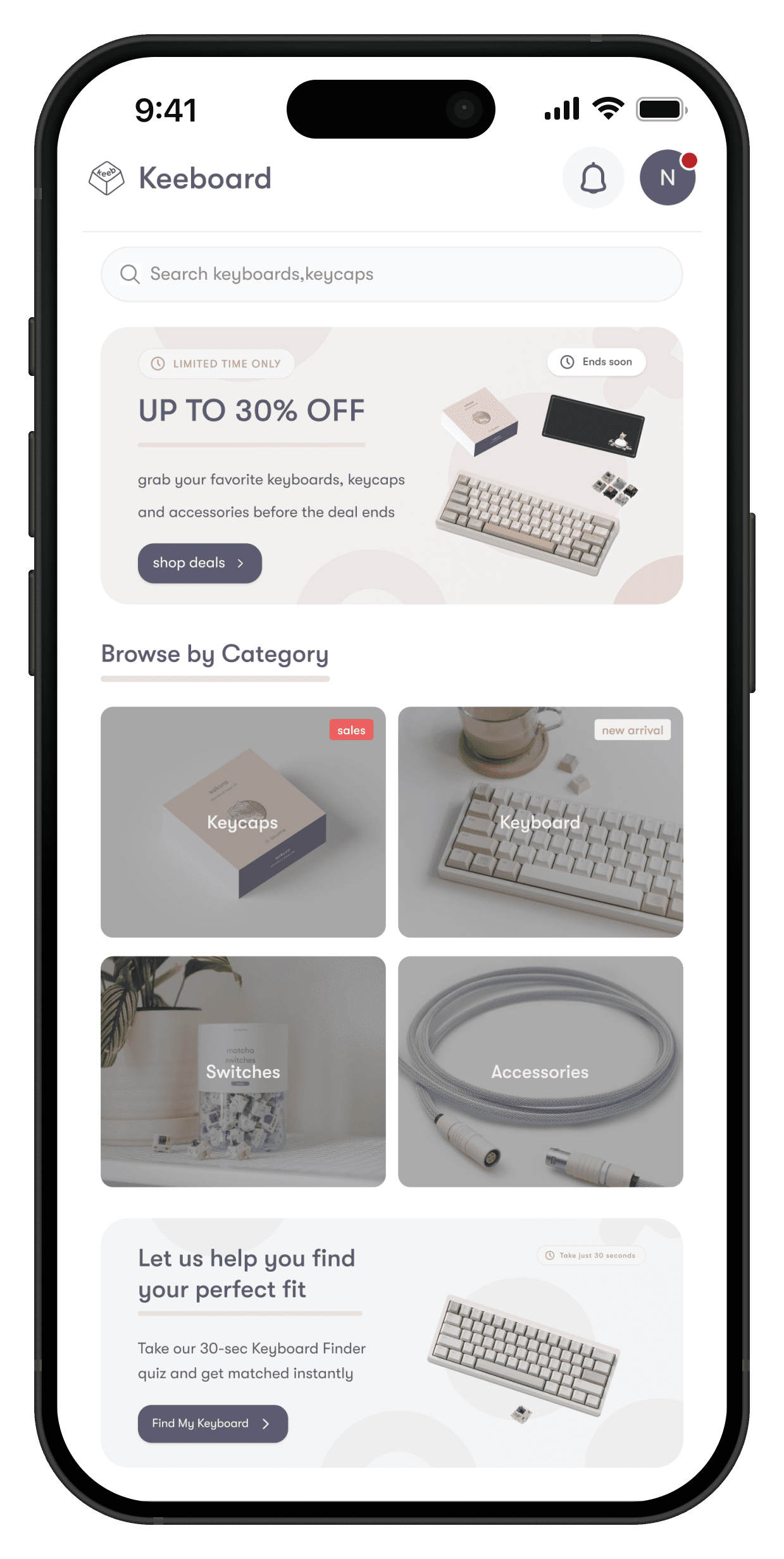
Keeboard is designed to streamline the shopping experience for mechanical keyboard enthusiasts. It enables users to browse a premium selection of keyboards, purchase products, and track orders through an intuitive,
user-friendly and aesthetic interface.
Current e-commerce applications for keyboards are often overloaded with complex technical specifications, making them overwhelming for new users. The product information (Specs) is frequently presented in a cluttered manner, the customization process is unclear, and a confusing checkout experience leads to high cart abandonment rates.
To design a keyboard commerce application that prioritizes simplicity and functional elegance. The goal is to create a seamless user journey by providing clear navigation, an intuitive interface for product customization, and a fast, secure checkout process that enhances the overall shopping experience.
UX/Ui designer leading the mobile application design
conducting research,
storyboarding,
paper and digital wireframing,
iterating on designs,
making high-fidelity prototype
All about the user :
Keeboard is designed to streamline the shopping experience for mechanical keyboard enthusiasts. It enables users to browse a premium selection of keyboards, purchase products, and track orders through an intuitive,
user-friendly and aesthetic interface.
Keyboard apps are often data-heavy with specs, which reflects in confusing and overwhelming navigation.
It’s often a challenge to select specific switches, keycaps, or layouts in existing apps in a clear and easy way.
The purchasing process is often difficult and overloaded with unwanted information, making it hard to track high-value shipments.
Personas were selected by conducting user research and identifying common pain points, that frustrate and block the user from getting what they need from a product.



It is the series of experiences Carlos has as he achieve a specific goal. It was built on the his experience.
I developed a user journey map of Alex's experience with the app to highlight potential pain points and identify areas for improvement.
Purchase a high-quality mechanical keyboard and customize its features in a fast and clear way.

The project schematically :
I created various diagrams and storyboards to clarify and analyze the app's information and architecture. Afterward, I sketched paper wireframes and then transitioned to digital wireframes, building a low-fidelity prototype to conduct initial usability studies with stakeholders.
It's a structured scheme that outlines the pages and content hierarchy of the app.
Next step: creating the application map. My goal here was to make strategic information architecture decisions that would improve overall app navigation. The structure I chose was designed to make things simple and easy.

More "clear" version of wireframes in a digital form. Also all the important pages are added
in it.
On this step I used the Figma design tool to create digital wireframes of all the pages. Then I bonded all of them into the clear and smooth structure.
The goal is to show how all the pages and things interact with each other.

This is an examination of users and their needs, which adds realistic context to the design process
First, I conducted unmoderated usability studies with a few participants: they had to answer different questions about the app and share their observations while using the initial low-fi prototype. After getting the data, I analyzed it and synthesized the information obtained.
Finally, I found themes and came up with several insights.
The goal was to identify pain points that the user experiences with the app designs so the issues can be fixed before the final product launches.
In the beginning, users felt unsure about which switches or layouts would fit their needs. It would be great to add a "Help me choose" guide or clearer tooltips for technical terms like "Linear," "Tactile," or "Gasket Mount."
There was no easy way to hear the keyboard's sound profile on the main list page. It is necessary to add a Quick Play sound button directly on the product cards so users don't have to click into every product detail page.
Since custom keyboards often have long shipping times (or Group Buys), users wanted more than just a status text. Adding a Visual Map Tracking and a countdown for pre-order items would significantly reduce user anxiety.
The clear version :
On this step, first I created a static, high-fidelity Keeboard app design (keeping in mind all the conclusions from the previous phase of usability studies) that is a clear representation of a final product called design mockups.
After that, I created a high-fidelity prototype of the app.
To ensure visual consistency and a seamless user experience across the Keeboard application,
I developed a comprehensive Design System. This system serves as a single source of truth for all UI elements, allowing for scalable and maintainable design.
The color scheme was chosen to evoke a sense of "Premium Minimalism," reflecting the aesthetic values of the mechanical keyboard community.
I selected clean, GT Walsheim Pro typefaces to ensure maximum readability across different mobile screen sizes, especially when displaying dense "Technical Stuff" or specifications.
All components were designed with a modular approach:
Buttons: Rounded corners
Cards: Clean product cards with subtle drop shadows to create depth in the "Browse" and "Featured" sections.
These are a high fidelity design that represents a final product
I created all the app pages mockups, incorporating the right design elements such as typography, color, and iconography. I also included captivating and visually appealing images, and developed all the necessary components and elements.
The goal was to demonstrate the final Voo's app in as much detail as possible.


It's the detailed, interactive version of designs that closely match the look and feel of the final product.
I turned my mockups into a prototype that's ready for testing, using gestures and motion, which can help enrich the user experience and increase the usability of the app.
Browsing Category
Sorting Category
List of product
Adding to Cart
Checkout (Select delivery type and payment method)
Order successful
View order history
Tracking Order
The project schematically :
I created various diagrams and storyboards to clarify and analyze the app's information and architecture. Afterward, I sketched paper wireframes and then transitioned to digital wireframes, building a low-fidelity prototype to conduct initial usability studies with stakeholders. The final high-fidelity design successfully integrates complex technical specifications into a clean, minimalist interface that enhances the shopping experience for keyboard enthusiasts.
The series of hand-drawing frames that visually describe and explore a user's experience with a product.
Users found the Keeboard design to be intuitive and easy to use for choosing models, customizing parts, and tracking deliveries.
Even minor changes in how technical specs are presented can significantly impact the user experience. I learned to prioritize the genuine needs of the enthusiast community.
The series of hand-drawing frames that visually describe and explore a user's experience with a product.
Conduct follow-up usability testing: Perform a second round of testing on the new high-fidelity app iteration to ensure the checkout and delivery tracking features are as seamless as intended.
Identify additional areas of need: Explore further user needs, such as a "Community Build" section or "Sound Test" integration, and ideate on how to implement these new features into the current design system.
