Redesign SCB
Banking Application

Redesign SCB
Banking Application

Mobile Application

Role : UX/UI Design

The project itself :

Project Overview

This project explores a redesign of the SCB mobile banking application, aiming to simplify complex interfaces and improve clarity in everyday financial tasks.
By reducing cognitive load and prioritizing key user actions, the redesign transforms a feature-heavy experience into a more focused, decision-driven banking interface.

Problem:
  • Dense interface with high cognitive load

  • Core actions compete with secondary features

  • Unclear hierarchy in critical financial flows

  • Users must overthink simple banking tasks

Goal:

The redesign aims to:

  • Reduce cognitive load by simplifying screen layouts

  • Clearly prioritize core banking actions

  • Improve visual hierarchy to guide user attention

  • Separate input and confirmation states in sensitive flows

  • Increase user confidence and reduce the risk of mistakes

All about the design :

Design Approach / UX Strategy

The redesign focuses on shifting the mobile banking experience from a feature-driven interface to a decision-driven user experience.
Rather than exposing all available functions at once, the approach prioritizes helping users complete one clear action at a time—especially in high-risk financial tasks.
Each screen is designed around a single primary user intention, supported by secondary information only when necessary. This reduces cognitive load, minimizes hesitation, and lowers the risk of user error—particularly in flows such as account management and money transfers.

Key Design Principles

Decision-First UX:

Every screen is structured to support one main decision.
Instead of asking users to manage multiple inputs at once, the interface guides them step by step—allowing users to focus on what matters now before moving forward.

Reduce Cognitive Load

Dense layouts and competing elements were replaced with clearly separated sections and card-based grouping.

Progressive Disclosure

Information and actions are revealed progressively based on user intent.
Sensitive flows, such as money transfers, are broken into confirmation-based steps that distinguish clearly

Home page Redesign

The home screen was redesigned to reduce visual density and prioritize core banking actions.
The new layout shifts focus from feature listing to clear, task-oriented sections that help users quickly understand what they can do.

The home screen was redesigned to reduce visual density and prioritize core banking actions.
The new layout shifts focus from feature listing to clear, task-oriented sections that help users quickly understand what they can do.

The home screen was redesigned to reduce visual density and prioritize core banking actions.
The new layout shifts focus from feature listing to clear, task-oriented sections that help users quickly understand what they can do.

nice interior

Before (Old UI):

  • Feature-heavy grid layout

  • Multiple actions competing for attention

  • Core tasks buried among secondary services

Before (Old UI):

  • Feature-heavy grid layout

  • Multiple actions competing for attention

  • Core tasks buried among secondary services

After (New UI):

  • Clear section-based layout

  • Core actions prioritized at the top

  • Improved visual hierarchy and spacing

After (New UI):

  • Clear section-based layout

  • Core actions prioritized at the top

  • Improved visual hierarchy and spacing

Key UX Improvements

Reduced Cognitive Load:

Fewer elements are displayed at once, allowing users to quickly scan and act.

Clear Action Priority

Everyday banking actions such as transfers and payments are immediately visible.

Stronger Visual Hierarchy

Information is grouped into meaningful sections, guiding user attention naturally.

Account & Transaction Page Redesign

The home screen was redesigned to reduce visual density and prioritize core banking actions.
The new layout shifts focus from feature listing to clear, task-oriented sections that help users quickly understand what they can do.

The account and transaction page was redesigned to improve readability and help users quickly understand their financial status.
The new design focuses on clear information hierarchy, scannable transaction history, and reduced visual noise to support frequent balance checks and transaction reviews.

Before (Old UI):

  • Balance and account information blended with transaction history

  • Transaction list lacked clear visual rhythm, making it harder to scan

  • Important information (amount, transaction type) competed with secondary details

  • Users needed more effort to understand their current financial state at a glance

After (New UI):

  • Clear separation between account summary, quick actions, and transaction history

  • Balance and account details are visually prioritized at the top

  • Transaction list redesigned with consistent spacing and alignment

  • Positive and negative amounts are easier to distinguish

Before (Old UI):

  • Balance and account information blended with transaction history

  • Transaction list lacked clear visual rhythm, making it harder to scan

  • Important information (amount, transaction type) competed with secondary details

  • Users needed more effort to understand their current financial state at a glance

After (New UI):

  • Clear separation between account summary, quick actions, and transaction history

  • Balance and account details are visually prioritized at the top

  • Transaction list redesigned with consistent spacing and alignment

  • Positive and negative amounts are easier to distinguish

Key UX Improvements

Improved Information Hierarchy:

Account balance, account type, and key actions are visually separated from transaction history, allowing users to immediately understand their financial status without scrolling.

Better Transaction Scanability

Transactions are displayed in a clean, card-based list with consistent spacing, making it easier to scan amounts, dates, and transaction types.

Reduced Cognitive Load

By simplifying layout structure and removing unnecessary visual elements, users can focus on essential information without distraction.

Improved Information Hierarchy:

Account balance, account type, and key actions are visually separated from transaction history, allowing users to immediately understand their financial status without scrolling.

Better Transaction Scanability

Transactions are displayed in a clean, card-based list with consistent spacing, making it easier to scan amounts, dates, and transaction types.

Reduced Cognitive Load

By simplifying layout structure and removing unnecessary visual elements, users can focus on essential information without distraction.

Key UX Improvements

Improved Information Hierarchy:

Account balance, account type, and key actions are visually separated from transaction history, allowing users to immediately understand their financial status without scrolling.

Better Transaction Scanability

Transactions are displayed in a clean, card-based list with consistent spacing, making it easier to scan amounts, dates, and transaction types.

Reduced Cognitive Load

By simplifying layout structure and removing unnecessary visual elements, users can focus on essential information without distraction.

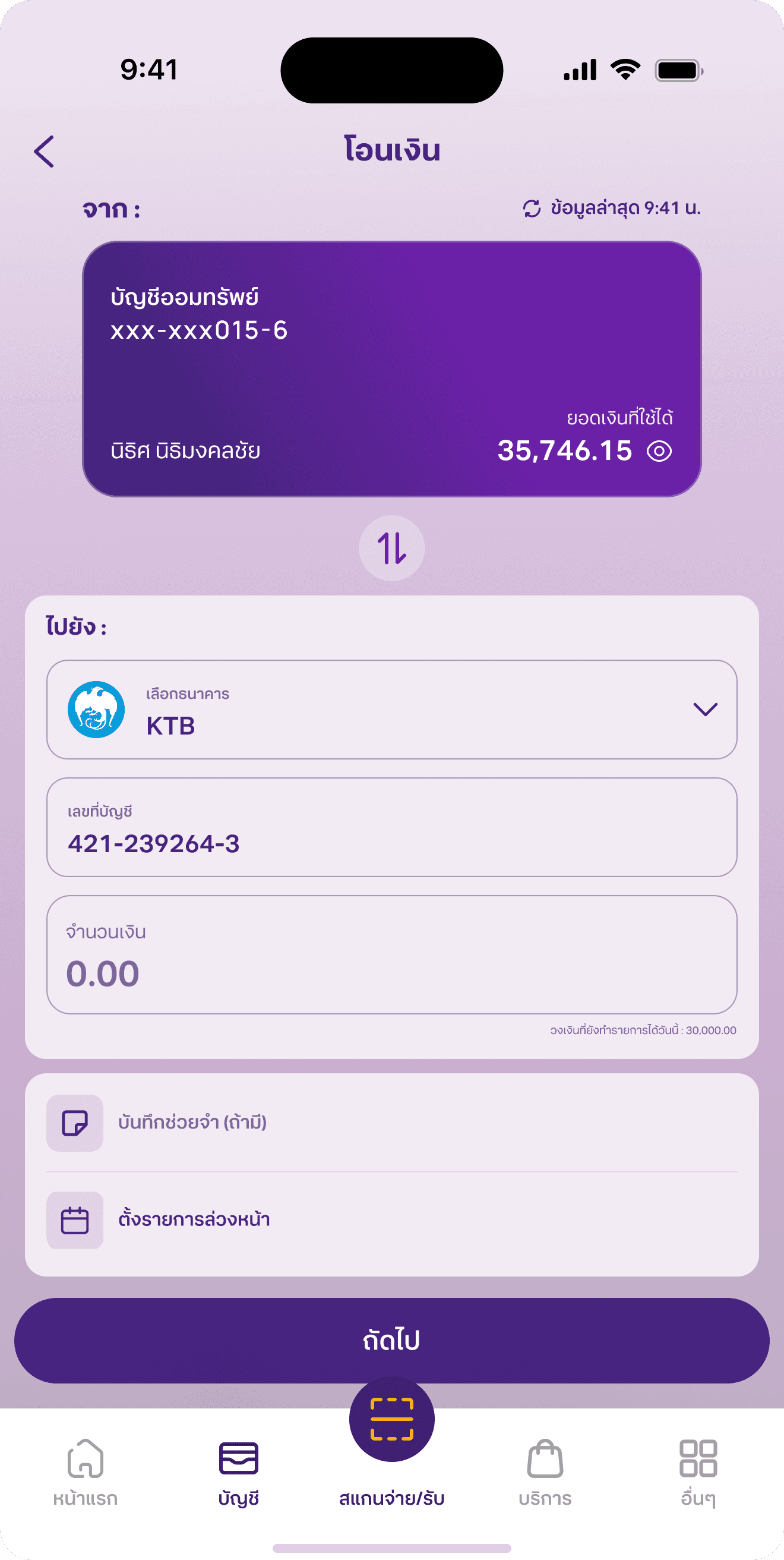
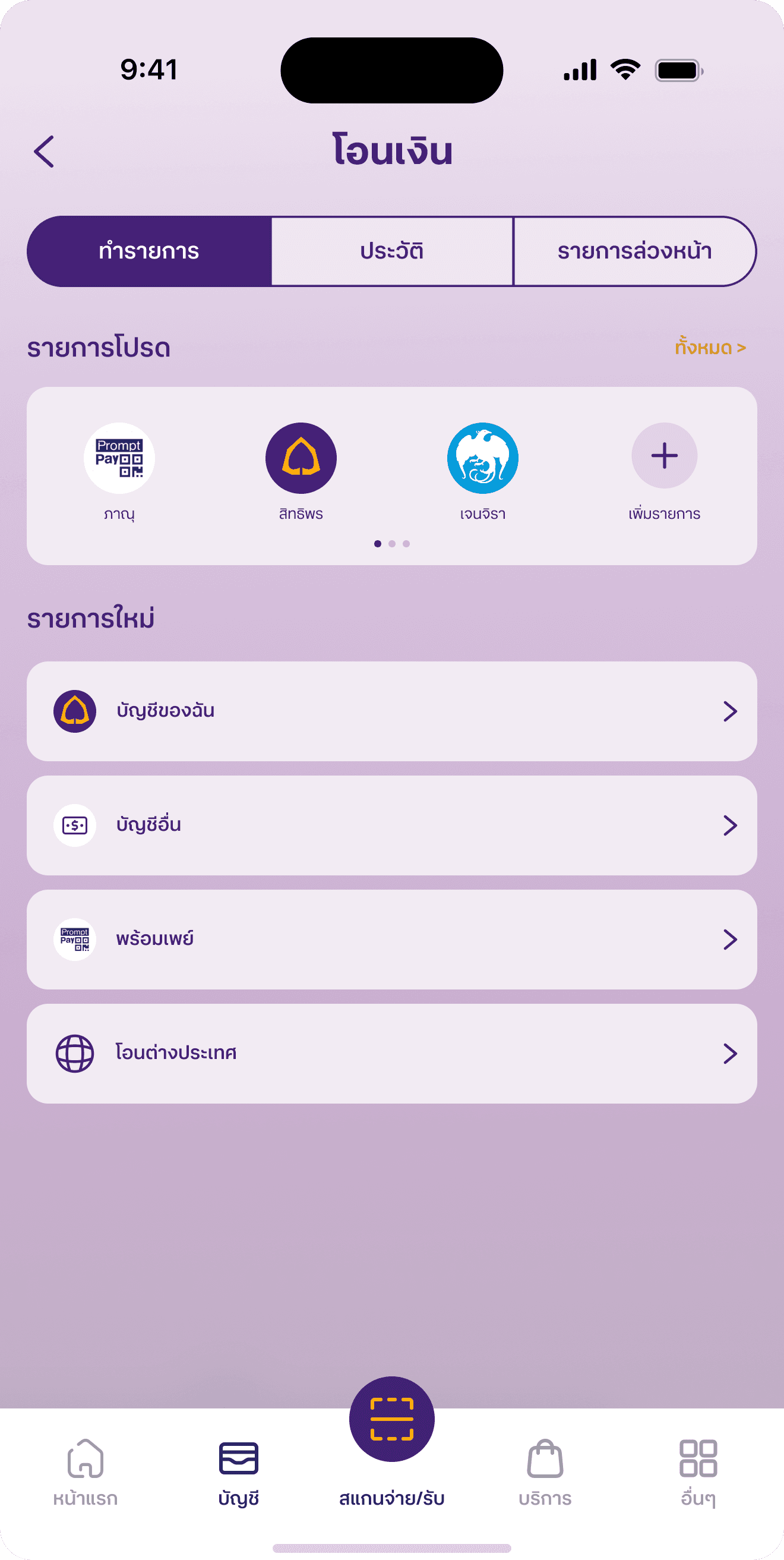
Transfer Flow Redesign

The transfer experience was redesigned to simplify a high-frequency financial task and reduce cognitive load during money transfers.
The new interface replaces a dense, option-heavy layout with a structured, step-based flow that guides users clearly from selection to input and confirmation.

The transfer experience was redesigned to simplify a high-frequency financial task and reduce cognitive load during money transfers.
The new interface replaces a dense, option-heavy layout with a structured, step-based flow that guides users clearly from selection to input and confirmation.

Before (Old UI):

  • Large grid of bank logos created visual overload

  • Weak separation between selection and input steps

  • Limited hierarchy between primary and secondary actions

  • Input fields lacked emphasis and structure

  • High cognitive load, especially for first-time users

After (New UI):

  • Clear step-based transfer flow separates selection and input stages

  • Account number and amount fields are clearly labeled and visually distinct

  • Recipient (“To”) section uses structured form fields for better input discoverability

  • Improved spacing and alignment enhance readability and reduce visual density

  • Logical grouping of optional actions (note, schedule) prevents distraction from the core task

Key UX Improvements

Guided Task Flow:

The transfer process is structured into clear stages, helping users move from account selection to input and confirmation without confusion.

Clear Input Hierarchy

Sender and recipient sections are visually separated, making it immediately clear where to review information and where to enter details.

Reduced Cognitive Load

By simplifying layout structure and removing excessive options, users can focus on completing the transaction efficiently.

Before (Old UI):

  • Large grid of bank logos created visual overload

  • Weak separation between selection and input steps

  • Limited hierarchy between primary and secondary actions

  • Input fields lacked emphasis and structure

  • High cognitive load, especially for first-time users

After (New UI):

  • Clear step-based transfer flow separates selection and input stages

  • Account number and amount fields are clearly labeled and visually distinct

  • Recipient (“To”) section uses structured form fields for better input discoverability

  • Improved spacing and alignment enhance readability and reduce visual density

  • Logical grouping of optional actions (note, schedule) prevents distraction from the core task

Key UX Improvements

Guided Task Flow:

The transfer process is structured into clear stages, helping users move from account selection to input and confirmation without confusion.

Clear Input Hierarchy

Sender and recipient sections are visually separated, making it immediately clear where to review information and where to enter details.

Reduced Cognitive Load

By simplifying layout structure and removing excessive options, users can focus on completing the transaction efficiently.

Before (Old UI):

  • Large grid of bank logos created visual overload

  • Weak separation between selection and input steps

  • Limited hierarchy between primary and secondary actions

  • Input fields lacked emphasis and structure

  • High cognitive load, especially for first-time users

After (New UI):

  • Clear step-based transfer flow separates selection and input stages

  • Account number and amount fields are clearly labeled and visually distinct

  • Recipient (“To”) section uses structured form fields for better input discoverability

  • Improved spacing and alignment enhance readability and reduce visual density

  • Logical grouping of optional actions (note, schedule) prevents distraction from the core task

Key UX Improvements

Guided Task Flow:

The transfer process is structured into clear stages, helping users move from account selection to input and confirmation without confusion.

Clear Input Hierarchy

Sender and recipient sections are visually separated, making it immediately clear where to review information and where to enter details.

Reduced Cognitive Load

By simplifying layout structure and removing excessive options, users can focus on completing the transaction efficiently.

nice interior

The project schematically :

Outcome / UX Impact

The redesign transforms the mobile banking experience from a feature-heavy interface into a clearer, decision-focused system that supports everyday financial tasks with greater confidence and efficiency.

Reduced Cognitive Load

By simplifying layouts, restructuring information hierarchy, and separating key actions into guided steps, users no longer need to process excessive information at once.
This results in a calmer and more manageable banking experience.

Faster Task Completion

Core actions such as checking balances and transferring money are now prioritized and easier to access.
The streamlined transfer flow reduces unnecessary decision points, enabling quicker task execution.

Improved Input Confidence

Clear separation between display information and editable fields minimizes hesitation and lowers the risk of user errors during high-stakes transactions.

Improved Input Confidence

Consistent visual hierarchy, structured layouts, and confirmation-focused flows reinforce user confidence before committing to financial actions.

Improved Input Confidence

Frequent tasks—such as reviewing transactions or making transfers—require less visual scanning and fewer mental steps, making the app more comfortable for daily use.

Stronger Sense of Trust

Consistent visual hierarchy, structured layouts, and confirmation-focused flows reinforce user confidence before committing to financial actions.

Better Everyday Usability

Frequent tasks—such as reviewing transactions or making transfers—require less visual scanning and fewer mental steps, making the app more comfortable for daily use.

Let me help with a great visual solution for your business.

To get in touch :

Contact Me

Set up a time to talk about your design needs.

Click to copy :

nithis.9h@gmail.com

© 2025

All built in

Let me help with a great visual solution for your business.

To get in touch :

Contact Me

Set up a time to talk about your design needs.

Click to copy :

nithis.9h@gmail.com

© 2025

All built in

Let me help with a great visual solution for your business.

To get in touch :

Contact Me

Set up a time to talk about your design needs.

Click to copy :

nithis.9h@gmail.com

© 2025

All built in

Let me help with a great visual solution for your business.

To get in touch :

Contact Me

Click to copy :

nithis.9h@gmail.com

© 2025

All built in

Create a free website with Framer, the website builder loved by startups, designers and agencies.